Category Archives: Hardware

Stuff

Canon 5D – can you say speed?

The fastest camera I have ever used

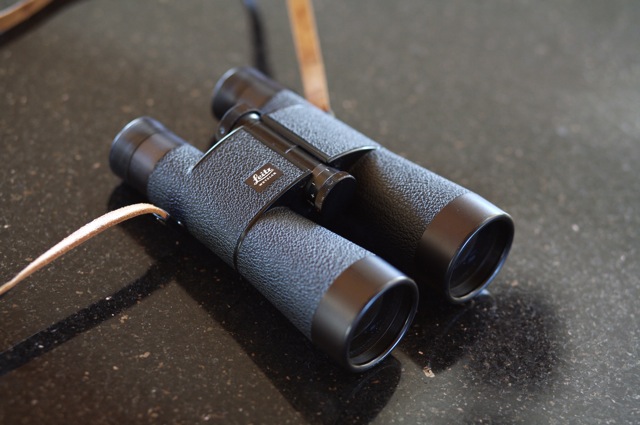
For over thirty years my camera of choice for street snaps was a Leica M2 or M3, typically with a 35mm or 50mm lens. This was the street snapper’s outfit par excellence.

Leica, of course is clueless about how to make a digital camera – they either badge engineer Panasonic’s and increase the price or make an overpriced, dated version of the fabulous M2 in the crippled-sensor M8.

In my experience, after using the 5D for some 15 months now, the 5D with the 24-105mm L zoom is faster in every respect. True, it’s a good deal bulkier than an M2 and not a bit noisier, but the automatic exposure and mind-numbingly fast and superbly accurate autofocus blows away the excellent Leica rangefinder in every way. We are talking operating speed here. Not high speed motor drives which are of little use in these situations. No I mean the speed of execution from seeing the picture to its recording.

Case in point. In continuing pursuit of pure color, and the hell with form and traditional composition, here’s the sort of thing which is second nature to this powerful lens/camera team (not to mention the operator):


Tattoo You. 5D, 24-105mm at 93mm, ISO 125, 1/350, f/4.5

It is hard to describe just how fast I had to be to snap this; the whole raising the camera/zooming/composing/snap cycle is just a blur in my memory. Exposure? Automatic. Focus? Automatic. Zoom? Manual – forget motorized zooms. Result? You be the judge.

And, while we’re at it, here’s another pair:


Twin Carb. 5D, 24-105mm at 105mm, ISO 250, 1/1500, f/5.6

Beating the burn

In overexposed highlights, that is

I have written before of the tendency of digital sensors to burn out highlight details. While highlights can be recovered using the Highlights slider in the Aperture Adjustments HUD, this is limited to one stop using RAW, in my experience. Thereafter, not all highlight details can be recovered.

Accordingly, in high contrast situations like outdoor sun, it’s far better to underexpose and use the Shadows slider to bring up shadow detail, rather than trying to recover highlights. The technique is illustrated here. A low noise sensor, like in the 5D, can sustain a lot of shadow enhancement before noise rears its ugly head.

Strangely, I find the large sensor in the Canon 5D more susceptible to highlight burn than the miniscule one in the Lumix LX1. Tfhe 5D’s sensor is some 1/2 stop more sensitive than the indicated ISO, compared with the Lumix. Given that HDR cannot be used with dynamic subjects (the three or five images required dictate the use of a tripod on a stationary subject) I simply underexpose by 1-2 stops in high contrast situations. Single image tone mapping can help, but it adds maybe half a stop at best; any more and the effect is garish. Canon provides exposure compensation on the 5D but is is horribly documented in the miserable book with a miniscule typeface that passes for instructions that comes with this camera. For $3,000 for a body only, this has to be the height of cynicism. Canon, please exclude accountants from the design of your machines and instruction books.

The 5D has a two position power switch, illustrated above. (The peeling on the screen is my stick on protector, not delamination of the LCD!). Normally, the switch is clicked up one notch to ‘On’ when using aperture priority – Av on the top left dial. Click it up one more notch to the line and the rear wheel activates exposure compensation, visible on the bottom of the viewfinder. It’s also displayed on the top LCD screen which is much easier to see than the viewfinder readout. By the way, a Manfrotto QR tripod plate is visible in this snap, permanently attached to the 5D’s base. Highly recommended – this is the ‘Architectural’ version with an alignment lip to preserve its position on the relatively heavy 5D body.

Click the on-off switch to the line, take a first pressure on the shutter release button, and rotate the wheel while looking though the viewfinder or at the top LCD screen. You can elect 1/2 or 1/3 stop intervals using the custom functions in the camera’s software. 1/3 is confusing precision with accuracy in my book, so I have it set to 1/2 stop intervals. I dial in the camera to, say, -1.5 stops, then immediately move the switch back to the regular On position to preclude accidental adjustment – the compensation setting wheel is disabled in this way, although the setting you dialed in is preserved. Better still (or not, if you forget), the setting survives switching the camera off. Power up and there is your setting, preserved.

I prefer to use average exposure metering in fast paced outdoor settings (Canon’s matrix metering leave me unimpressed) as there’s rarely time to take a proper exposure reading in the interest of capturing the moment. With this approach, you gain a stop of highlight adjustment while preserving some three stops of shadow recovery. Now that’s what I call dynamic range.

Here’s an example taken in bright sun yesterday:


5D, 24-105mm at 70mm, ISO 250, 1/3000, f/5.6, one stop underexposed

Without the underexposure, the white sheet would have been comprehensively burned out. Here, detail is preserved.

A Wii lesson for camera makers

Simple is good – when will camera makers learn that?

After stentorian efforts to actually buy one, our experience with the Wii game console from Nintendo is nothing short of a revelation.

You open the box, plug it in, disregard the 500 warning messages to keep scum tort lawyers in their place, and play. Wave the controller about and the player on the screen moves in sync. The graphics are simple, verging on crude, the big instruction book can be disregarded and the result is insane fun!

Now I have to add that I do not play video games. Our son does, now. The above paragraph should have been written by him, except he is just five and his typing needs work. Come to think of it, he can’t read either. But just ask him if he enjoys his Wii.

Nintendo, like Apple, Thinks Different. Where Sony and Microsoft make game consoles of increasing complexity, with their sleazy back door attempt at taking control of your home computing, Nintendo focused on just a few things – ease of use, price and fun. Result? The competition is scrambling to emulate Nintendo’s wireless controller with its built in accelerometers and speakers. It will take them a year. The results won’t be pretty, thanks to Nintendo’s patents. First three month sales of the Wii exceed those of any other game console ever made. The stock has doubled in the past year. Get my drift?

So unless Nintendo or Apple decide to make a camera (I wish!), there’s a huge opening here for manufacturers looking to make a profitable entry into the market. Scrap all those silly buttons, LCD screens, largely useless zoom lenses, slow response times and poor ergonomics. Make the lens fixed. Add an optical viewfinder. Give it just one button – the one you click to snap the picture. Abolish shutter lag. So far that’s all like the Box Brownie of one hundred years ago on which, believe me here, the patents have expired. Put in a big sensor to ban image noise. Make it wireless to upload pictures to your computer. And, like the Wii, sell it for $299. Or $199. Or $99.

Happy users and profits follow. What am I missing here?

The problem with P&S cameras

Bottom line is, they all suck

Having just read another thoroughly depressing review of yet another Point & Shoot offering from a major manufacturer on the estimable DPReview.com, I have to wonder.

This one claims to be a top of the line offering. DPReview begs to differ, concluding that the camera has slow focusing and poor image sharpness, not to mention no RAW mode, a clunky interface and useless zoom range. It’s priced at some $350.

So why do these major manufacturers, and they are all guilty – Nikon, Canon, Olympus, Pentax, etc. – persist in turning out such execrable equipment?

A recent move by Canon to drop RAW from its P&S cameras may be a clue. The few of these cameras that have half decent lenses would likely embarass the costlier DSLRs from these same makers for half the price. So the consumer gets to suffer on the altar of product differentiation.

That’s a shame, so I suppose it’s little wonder that the much anticipated Sigma DP1 P&S will likely cost closer to $1000 than $300; on the other hand, you get a half decent sensor for your money. If the camera focuses fast, has low shutter lag and a decent lens – not something Sigma’s history of truly frightful lenses makes me too positive about – my $800 is waiting.

That’s if we will ever see this icon – it was last announced that the camera would be available 5 months ago.

Mirror slap in the 5D revisited

The Custom setting on the mode dial fixes things

In my little experiment to determine the seriousness of mirror slap-induced blur, I concluded that locking up the mirror before taking long exposures on a tripod made sense. Sharpness was improved – not something that would make any diffference for regular prints or web images, but clearly an improvement with big prints.

At the same time I grumbled about the difficulty of finding the right setting on the LCD panel on the rear of the 5D when it came to actually locking up the mirror, a problem compounded by the poor visibility of the LCD screen outdoors. Well, until someone comes up with a neat software fix to reprogram the little used ‘Print’ button on the back of the camera to lock up the mirror, here’s the next best thing.

Set up your camera for your preferred mode of use, go the the LCD screen and set the mirror to lock-up on the first pressure on the shutter release, using Custom Function 12. Now set the mode dial to ‘C’ (the dial to the left of the prism atop the body), go back to the LCD screen and click on ‘Register Camera Settings’. In this way, anytime you set the mode dial to ‘C’ you will have mirror lock-up available.

In my case, the preferred settings are Aperture Priority (meaning I set the camera up with the Mode Dial at ‘Av’), ISO at 250, center area average metering and the RAW file format.

So next time the camera goes on a tripod I will simply move the mode dial to ‘C’ and off we go.


The 5D’s Mode Dial set to ‘C’