I take a leaf from the gamers’ book.
My initial enthusiasm for the Apple Magic Mouse has cooled.
There are three reasons.
The first is that it frustratingly loses the Bluetooth connection now and then which simply drives me up the wall. It does this both with my HackPro and, far more often, with the MacMini I use to watch stored movies. You would think it would work better with Apple’s hardware, but no. And that’s from two MagicMice – so unlikely it’s a sample fault. Go figure.
The second is that the ergonomics are not right. Even though the device is gorgeous to behold, it’s too low and I am developing wrist pain after extended use. And whoever designed that sharp edge – on a device meant to be held in the hand – well, the less said the better.
The third, another cause of extreme frustration, is that I cannot consistently get to the desktop by touching a selected point on the surface no matter how hard I try, using the MagicPrefs application I mention in my earlier piece. The touch point seems to change at random, working when it wants to. Just beyond irritating and the reason that finally made me change.
I checked around and one photographer friend recommended a Logitech model (the MX900) but sadly that is discontinued here. Others prefer to use the multi-touch pad on the MacBook Pro or whatever. However, I need a mouse for business use and also find it the easiest way to outline areas in Photoshop where localized manipulation is required.
So as those in the farming community like to say, I got me to thinking. Who would know most about mice? Why, the gaming community of course. They use them all day long, use them hard and are very demanding when it comes to smooth and instantaneous response. So I checked reviews of gaming mice with the following dictates in mind:
- Must be wired. I am through with batteries, RF and Bluetooth.
- Must have outstanding ergonomic design.
- Must be programmable for use with Mac OS X Snow Leopard.
- Must be super responsive.
- Has to have a scroll wheel.
I eventually settled on the fancifully named Razer Death Adder 3500dpi mouse, replete with glowing scroll wheel and adder design on the body. Mercifully, the glow can be switched off. On receipt, I downloaded the latest software from Razer’s site and read through the comprehensive instructions. The application runs as a stand alone program rather than installing as a System Preference pane. The Mouse pane in System Preferences continues to work so you can experiment between that and the settings in Razer’s application, though the latter has many more options.
The contrast in shape with the MagicMouse is clear from the picture:
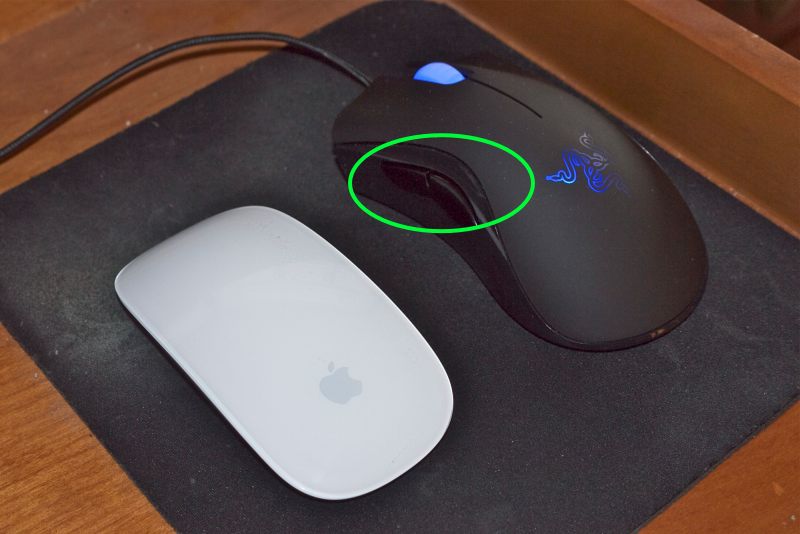
Two side buttons circled. Illuminated scroll wheel and death adder (!) switched on for this picture.
The Death Adder is larger in all dimensions, maybe too large for small hands; most importantly it is far taller, meaning your palm rests lightly on it, which is impossible with the Magic Mouse. It’s some 1 3/4″ tall compared to 7/8″ for the Magic Mouse – that’s a big difference. The indented sides further aid comfort. The left and right buttons are discrete and a comfortable concave shape, unlike on the Magic Mouse which uses a contiguous convex surface and, although the Razer’s two programmable side buttons are on the left only, the mouse can be configured for left hand use. Nice. For serious lefties there’s a true left handed version with the buttons on the right. Every control surface can be programmed for any action and macro programming is also possible. I left dpi and polling at their maximum settings (only a slow CPU working near capacity would need these reduced) and simply programmed the side buttons for Desktop and Dashboard, respectively, and programmed a press on the scroll wheel for Exposé- all windows. I hop into the desktop and between apps often.
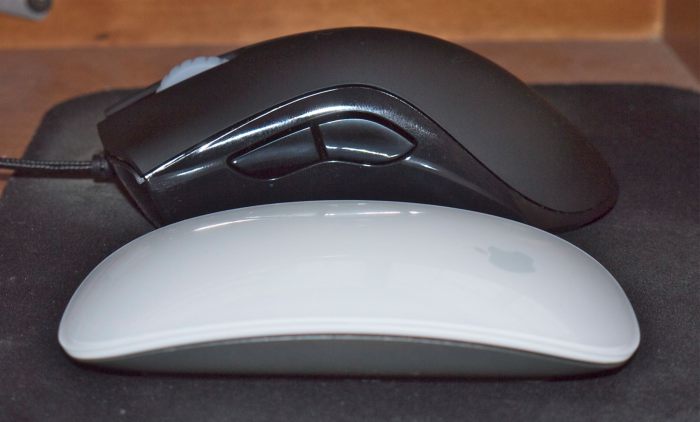
The dramatic height difference is clear.
Double click speed, scrolling sensitivity, cursor speed/acceleration are all adjustable. I have scrolling set to the lowest speed otherwise it’s crazy fast. It’s a fraction heavier than the Magic Mouse which means just right. There’s a satisfying heft to it. The cord provided is very long at 7 feet – no issues reaching the HackPro under my desk. When shipped the lower surface is protected with clear plastic; once removed the mouse is wonderfully smooth on a mouse pad, resting on three protruding nylon pads. The side buttons are responsive and you can even adjust the delay before they kick in. There is no ball, a laser beam being used for tracking. Tracking is very smooth – I can detect no jerkiness or ‘steps’ as the cursor is moved on screen. It’s as good as the Magic Mouse in that regard, meaning excellent.
What’s not good? Vertical scrolling is stepped rather than smooth, something that only Apple seems to do right. The scroll wheel does not tilt sideways for horizontal scrolling, though it’s not a feature I miss. Let’s hope that the eventual ingress of dirt through the scrolling wheel will not wreck the mouse in the way the Magic Mouse’s predecessor, the Mighty Mouse, would fail. The Lazer’s body is sealed, so it’s not like you can clean it.
Other than that, the Razer Death Adder seems like a winner, at under $50. I had $20 left over after unloading both my (not so) MightyMice for $35 each. Good riddance. The only thing that ‘Just Works’ here is eBay.
The current issue of The New Yorker has an interesting piece by experienced technical writer Malcolm Gladwell about how a young Steve Jobs saw a prototype of the original mouse at Xerox’s Palo Alto Research Center in the 1970s. He had his engineers make it mass produced and cheap. Too bad Apple has forgotten how to design a good mouse. Like its iMac, the Magic Mouse is a triumph of form over function, looks trumping all else in the design brief.