Could this be the reason?
I was Googling the subject of sensor dust, which so seems to bedevil the 5D, and came across a very funny criticism by one user who may well come from eastern Europe, given the grammar. What it misses in terms of the Queen’s English it gains in clarity.
“Is vacuum pump, not camera”.
So it got me to thinking. Could the lens design have something to do with it? After all, per square inch of sensor, the 5D should gather no more or less dust than its siblings, cropped or full frame, yet the 5D seems to be a problem more often than the other models.
Part of it may be that users of the full frame sensor in the 5D are either consistently making big enlargements or pixel peeping in Photoshop just to appreciate the gorgeous definition of which this sensor is capable. Bottom line, they enlarge more, because they can, and more magnification means more dust becomes visible. On the other hand, a like-sized print from a cropped sensor camera requires a 60% greater enlargement ratio, so maybe this is not a good explanation.
Yet why is it that I can put away my 5D with 24-105mm in place – my ‘standard’ lens – only to find that sensor dust has reappeared even though the lens has not been removed?
So I took the 24-105mm off the camera and, holding the rear to my cheek, worked the manual zoom ring. Sure enough, a ‘whoosh’ of air could be felt when the ring was activated vigorously. You can gauge the stroke here with the lens set at 24mm and 105mm, respectively:
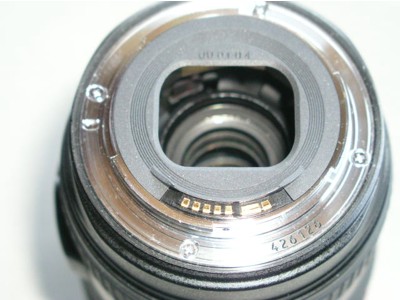
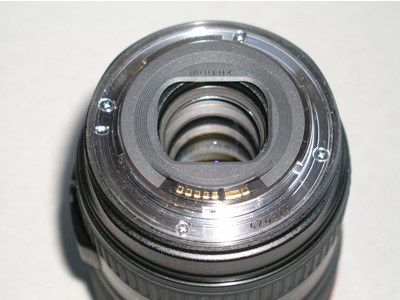
Focusing seems to generate no air rush, probably because the lens uses internal focusing. Likewise for my 85mm f/1.8 and 200mm f/2.8 lenses. By contrast, the 15mm Fisheye and the 50mm f/1.4 use traditional focusing, but the throw is so short that no detectable rush of air could be felt using the ‘cheek test’.
So let’s assume that cropped sensor Canon users for the most part avoid the 24-105 (the effective range of 38-168mm being far less useful to them than the 24-105mm on a full frame sensor). So 5D users, many of whom favor this lens, do indeed have a ‘vacuum cleaner’, or more correctly, an air pump, attached to their cameras. The only thing I cannot figure out is why 1D and 1Ds/Mark II full frame users rarely complain of this malady. Maybe they opt for the 17-40mm, 16-35mm and 70-200mm L lenses, all of which seem to have a superior reputation for dust sealing? In this regard, the 24-105mm is anything but ‘pro’ quality, though there’s no arguing with the superb optical performance.
For me the cure is probably to avoid using the 24-105mm in dusty, dry conditions, opting for fixed focal length lenses in lieu. Not very satisfactory.
Maybe someone out there has done some comparative testing of the issues and causes?
All this said, the net throughput even when sensor dust intrudes, is still exceptional, especially if a ‘roll’ needs the use of the stamp & clone feature in Aperture, which allows simultaneous removal of dust motes in the image from multiple pictures at the same time.